Apple Foundation Models: Hybrid AI with Dynamic Profiles
Have your cake and eat it, too
Apple’s Foundation Models framework gives us free, private, and on-device access to AI. It’s got an easy-to-use API, and with just a few lines of code you can implement powerful AI features that run on device and don’t require internet access.
This sounds like you can have your cake and eat it, too - right?
However, on-device models come with a number of limitations: due to the constraints of mobile devices (memory, compute, thermal considerations), the amount of data they can process is limited, as is their throughput. Most on-device models also aren’t reasoning models.
This means you typically have to resort to cloud-hosted models for workloads that operate on larger datasets, need fast throughput, or require the reasoning capabilities of frontier models.
Apple has realised this as a gap in their AI offering, and have enhanced the Foundation Models framework to also support cloud-hosted models, like Claude and Gemini. Thanks to Apple’s open source foundation-models-utilities package, you can even connect to any model that supports OpenAI’s Completions API.
Apple’s Dynamic Profiles feature gives us a clean way to solve this.
The Foundation Models framework
The Foundation Models framework, introduced at WWDC25, gives you access to the on-device language model that powers Apple Intelligence.
Getting a response from the model takes just a few lines of code:
// Step 1: set up the model
let model = SystemLanguageModel()

// Step 2: set up the session
let session = LanguageModelSession(
    model: model,
    instructions:
        """
        Summarize the following text concisely into a single, \
        continuous paragraph of prose. Focus on the key points. \
        Do NOT use bullet points, lists, conversational intros, \
        preambles, or explanations.
        """
)

// Step 3: prompt the model
let response = try await session.respond(to: text)
All of this runs locally, so no data ever leaves the device.
However, as mentioned before, there are some downsides, some of which might be more serious than others:
- Context window size: Even with an 8k token limit, large documents, lengthy meeting transcripts, or multi-turn chat histories won’t fit.
- Latency: Users demand snappy responses, and anything that takes longer than single-digit seconds will result in churn.
- Reasoning: On-device models are great for content extraction, summarisation, and rephrasing, but they lack the multi-step reasoning capabilities of frontier models.
Accessing Gemini via the Foundation Models framework
The good news is that Apple opened up the Foundation Models framework to third-party providers by way of the LanguageModel protocol at WWDC26.
Both Anthropic and Google provided implementations on day one, allowing you to access their cloud-hosted frontier models Claude and Gemini through the same API that you use to call the on-device model.
In addition, you can use Apple’s ChatCompletionsLanguageModel (part of Apple’s open source foundation-models-utilities Swift package), which can communicate with any server that supports the chat completions REST API.
Here is the same code snippet I showed you earlier, but for Gemini (via Firebase AI Logic).
// Step 1: set up the model
let ai = FirebaseAI.firebaseAI()
let model = ai.geminiLanguageModel(name: "gemini-3.6-flash")

// Step 2: set up the session
let session = LanguageModelSession(
    model: model,
    instructions:
      """
      Summarize the following text concisely into a single, \
      continuous paragraph of prose. Focus on the key points. \
      Do NOT use bullet points, lists, conversational intros, \
      preambles, or explanations.
      """
)

// Step 3: prompt the model
let response = try await session.respond(to: text)
Notice that the only difference is the model setup - the code for setting up the session and prompting the model stays the same, no changes required.
That’s the power of protocol-oriented programming: which model you’re using is an implementation detail, and since both the on-device model and the cloud-hosted model sit behind the same API surface, switching between them is a one-line change rather than a full-on rewrite.
Why hybrid AI
The performance of language models is largely determined by the amount of memory and compute we can allocate to the inference process.
It shouldn’t come as a surprise that mobile devices have serious limitations in this department, and the OS needs to balance the amount of memory it assigns to the model with the foreground application and all the other processes that keep the system running smoothly.
Thermal considerations are also relevant - nobody likes to burn their hands just because your app tries to generate a smart reply to a meme their friend sent them.
This is why on-device models have a relatively small context window size. The original release of Apple’s on-device model had a context window size of 4096 tokens - just about enough for summarising medium-length blog posts. The current generation of Apple’s on-device models have a context window size of 8192 tokens - double the original, but still not enough for documents like the App Store Review Guidelines (292,652 characters, or roughly 60,655 tokens).
And since even the most modern A-series chips can’t compete with a data centre full of GPUs, the latency of running on-device inference is often higher than what you get with fast cloud-hosted models.
Below are the results of an (admittedly completely unscientific) benchmark I ran on my iPhone 17 Pro (iOS 27 beta 5) comparing the performance of Apple’s latest on-device model against some cloud-hosted models. Gemini 3.5 Flash Lite outperforms the on-device model even for short texts.
| Characters | Tokens | On-device (iOS 27 b5) | Gemini 3.6 Flash | Gemini 3.5 Flash Lite | |
|---|---|---|---|---|---|
| Here’s to the crazy ones | 550 | 131 | 2.2s | 3.83s | 1.57s |
| Google IPO Letter | 3132 | 621 | 3.77s | 5.59s | 1.52s |
| Steve Jobs Stanford speech | 12037 | 2759 | 6.95s | 6.24s | 1.61s |
| Apple Intelligence WWDC Press Release | 10417 | 2069 | 8.89s | 6.53s | 1.47s |
| House of Usher (Edgar Allan Poe) | 18414 | 3950 | 10.89s | 9.52s | 1.72s |
| App Store Review Guidelines | 292652 | 60655 | N/A1 | 10.88s | 1.88s |
1 - The text of the App Store Review Guidelines is well beyond the size of the on-device model’s context window size of 8k tokens
Count your tokens
How can we reap the benefits of on-device models and overcome their limitations? Let’s focus on the context window size first.
If we want to use the on-device model for texts that fit the 8k context window, and fall back to the cloud for any text that is longer than that, we could decide to implement a failure-based fallback mechanism.
Using the on-device model is free after all, so we can try local inference first, and fall back to a cloud-hosted model if this fails.
Here is how you might implement this:
do {
    // Take 1: Try running local inference first
    let model = SystemLanguageModel()
    let session = LanguageModelSession(
        model: model,
        instructions: instructions
    )
    let response = try await session.respond(to: text)
    return response.content
} catch {
    // Fallback to cloud-hosted Gemini if local inference fails
    let ai = FirebaseAI.firebaseAI()
    let model = ai.geminiLanguageModel(name: "gemini-3.6-flash")
    let session = LanguageModelSession(
        model: model,
        instructions: instructions
    )
    let response = try await session.respond(to: text)
    return response.content
}
This naive approach has a couple of drawbacks, however.
Running local inference is not entirely free of cost - you’re still consuming a small amount of the user’s battery. More importantly, if the local inference fails because the input exceeded the context window size, you’ve wasted the user’s time.
To avoid wasting time and conserving precious battery, it’s better to verify if the model will be able to perform the task before you schedule it.
Apple added two APIs to the framework that make this possible: tokenCount(for:) and contextSize. These allow you to measure the number of tokens your prompt (or instructions, tool definitions, or schemas) amount to, and compare them to the context window size of the system model:
let systemModel = SystemLanguageModel.default
let promptTokens =
    (try? await systemModel.tokenCount(for: text))
        ?? Int(Double(text.count) / 4.2) // Fallback heuristic: ~4.2 chars per token
let outputHeadroom = 1000
let fitsLocally = systemModel.isAvailable
    && (promptTokens + outputHeadroom) <= systemModel.contextSize

let model: any LanguageModel = fitsLocally
    ? systemModel
    : FirebaseAI.firebaseAI().geminiLanguageModel(name: "gemini-3.6-flash")

let session = LanguageModelSession(
    model: model,
    instructions: instructions
)
let response = try await session.respond(to: text)
This does the job, but there is a better way to do this!
What are Profiles?
A LanguageModelSession.Profile is a framework concept that allows you to encapsulate instructions alongside other properties that are relevant for a session. You can pass a profile to a LanguageModelSession when you create it:
// 1. Directly instantiate the profile
let profile = LanguageModelSession.Profile {
    Instructions(
        """
        Summarize the following text concisely into a single, \
        continuous paragraph of prose. Focus on the key points. \
        Do NOT use bullet points, lists, conversational intros, \
        preambles, or explanations.
        """
    )
}
.model(SystemLanguageModel.default)
.temperature(0.3)

// 2. Initialize the session with the profile
let session = LanguageModelSession(profile: profile)

// 3. Prompt the session
let response = try await session.respond(to: text)
What are Dynamic Profiles?
Dynamic profiles allow a LanguageModelSession to switch between any number of Profiles based on any kind of condition.
Let’s say you want to allow users to choose between concise and more detailed summaries. Here’s how you can achieve this with a dynamic profile:
struct OnDeviceSummarizationProfile: LanguageModelSession.DynamicProfile, Sendable {
    enum Style: Sendable {
        case concise
        case detailed
    }

    var style: Style = .concise

    private static let conciseInstructions = """
        Summarize the following text concisely into a single, \
        continuous paragraph of prose. Focus on the key points. \
        Do NOT use bullet points, lists, conversational intros, \
        preambles, or explanations.
        """

    private static let detailedInstructions = """
        Provide a comprehensive summary of the following text, \
        synthesizing the major arguments and key findings into \
        structured prose.
        """

    var body: some LanguageModelSession.DynamicProfile {
        switch style {
        case .concise:
            Profile {
                Instructions(Self.conciseInstructions)
            }
            .model(SystemLanguageModel.default)
            .temperature(0.2)

        case .detailed:
            Profile {
                Instructions(Self.detailedInstructions)
            }
            .model(SystemLanguageModel.default)
            .temperature(0.5)
        }
    }
}
At the call site, you can switch between these two modes with a one-line change:
// 1. Instantiate the custom DynamicProfile
let profile = OnDeviceSummarizationProfile(style: style)

// 2. Initialize the session with the dynamic profile
let session = LanguageModelSession(profile: profile)

// 3. Prompt the session
let response = try await session.respond(to: text)
Hybrid AI with Dynamic Profiles
Let’s take what we’ve learned about Dynamic Profiles and implement a hybrid AI router.
Just like in the naive implementation above, we want to use the on-device model for any text that fits its 8k context window. Any text that is larger should be handled by Gemini:
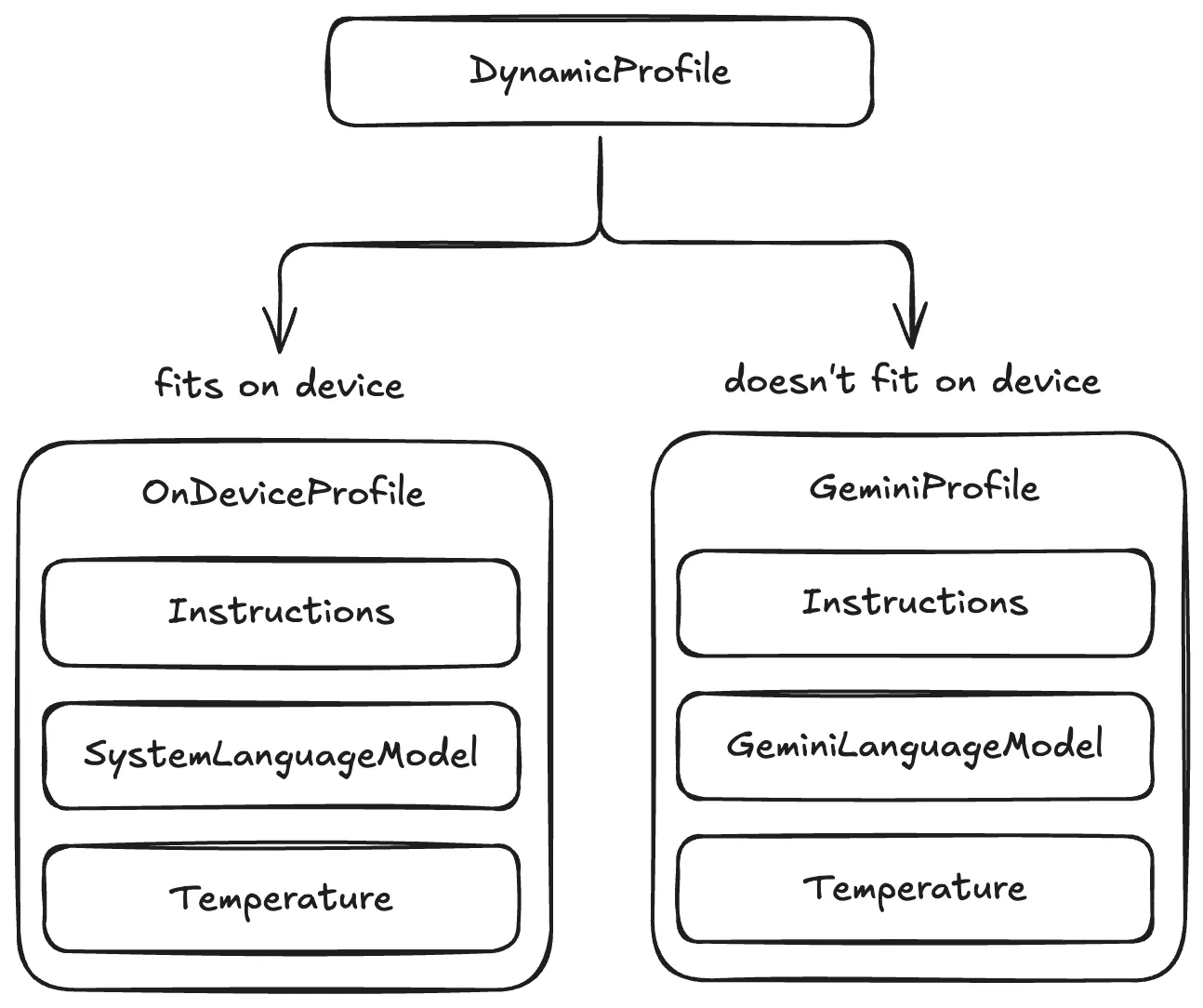
First, here’s the dynamic profile. Notice how we’re using slightly different instructions for the on-device model and Gemini. This is to demonstrate that you can use profiles to make best use of the models’ respective capabilities and strengths.
struct HybridSummarizationProfile: LanguageModelSession.DynamicProfile, Sendable {
    let fitsOnDevice: Bool
    let geminiModelName: String

    private static let onDeviceInstructions = """
        Summarize the following text concisely into a single, \
        continuous paragraph of prose. Focus on the key points. \
        Do NOT use bullet points, lists, conversational intros, \
        preambles, or explanations.
        """

    private static let cloudInstructions = """
        You are an expert executive summarizer. Analyze the \
        provided text and synthesize the core takeaways into \
        a continuous paragraph of prose, capturing subtle \
        nuances without introductory filler.
        """

    /// Async initializer evaluating exact prompt
    /// and instruction tokens against SystemLanguageModel limits
    init(for text: String, geminiModelName: String = "gemini-3.6-flash") async {
        self.geminiModelName = geminiModelName
        let systemModel = SystemLanguageModel.default
        let contextSize = systemModel.contextSize
        let outputHeadroom = 1000

        let promptTokens =
            (try? await systemModel.tokenCount(for: text))
                ?? Int(Double(text.count) / 4.2)
        let instructionTokens =
            (try? await systemModel.tokenCount(for: Self.onDeviceInstructions))
                ?? 60

        self.fitsOnDevice =
            systemModel.isAvailable
                && (promptTokens + instructionTokens + outputHeadroom)
                <= contextSize
    }

    var body: some LanguageModelSession.DynamicProfile {
        if fitsOnDevice {
            Profile {
                Instructions(Self.onDeviceInstructions)
            }
            .model(SystemLanguageModel.default)
        } else {
            Profile {
                Instructions(Self.cloudInstructions)
            }
            .model(
                FirebaseAI.firebaseAI()
                    .geminiLanguageModel(name: geminiModelName)
            )
        }
    }
}
And now, with all the model configuration neatly tucked away in a profile, the call site becomes super clean:
// 1. Initialize the dynamic profile with our input text
let profile = await HybridSummarizationProfile(for: text)

// 2. Pass the dynamic profile directly into the session
let session = LanguageModelSession(profile: profile)

// 3. Prompt the session
let response = try await session.respond(to: text)
This pattern really lets you have your cake and eat it too:
- Separation of concerns: Your service layer and the UI can be completely decoupled from all the routing logic, token budget checks, and prompt tailoring. All of this now lives inside the profile.
- Model-specific prompt optimisation: Models behave differently, and this pattern allows you to fine-tune the prompt for each model you support.
- Declarative composition: The
bodyof the dynamic profile is a clean, synchronous result builder that makes use of a DSL that feels familiar to everyone who has used SwiftUI before.
Conclusion
Declarative DSLs enable developers to express complicated systems in more manageable and easier-to-understand ways. Over the past couple of years, Apple has embraced DSLs in numerous places to simplify complex systems:
- SwiftUI completely changed how we build UIs today.
- SwiftData and App Intents use DSLs to express type-safe schema definitions and system integrations.
- RegexBuilder turned writing complex RegEx strings into readable Swift structs.
And now, with Dynamic Profiles, they’ve made implementing agentic features in Swift a lot easier than it ever used to be.
By opening up the Foundation Models framework for third-party model providers, Apple has established a unified approach to implementing AI features in Swift apps. Switching from one model to the other no longer requires a full rewrite of the respective feature in your app.
You now really can have your cake and eat it, too.
Getting started with System One models in Swift
Fast, deterministic AI decisions with Apple Foundation Models
Agentic Coding in Xcode with Gemini CLI
Build apps with AI assistance in Xcode using Gemini CLI

Turn Your Photos Into Miniature Magic with Nano Banana
Build stunning image generation apps in iOS with just a few lines of Swift

Reverse-Engineering Xcode's Coding Intelligence prompt
A look under the hood